Table of contents
Concepts You Should Know First
Before getting hands-on, having these concepts straight will make your OpenClaw experience much smoother.
OpenClaw uses a "micro-kernel + plugins + unified gateway" architecture — think of it as an "AI operating system."
Architecture Overview
WhatsApp / Telegram / Slack / Discord / Feishu / ... / WebChat
                         │
                         ▼
            ┌──────────────────────┐
            │      Gateway         │
            │  (control plane/hub) │
            │  ws://127.0.0.1:18789│
            └──────────┬───────────┘
                       │
           ┌───────────┼───────────┐
           │           │           │
       Pi Agent     CLI tools    WebChat UI
       (RPC)     (openclaw...)   macOS App
                               iOS/Android
Core Concepts
Gateway
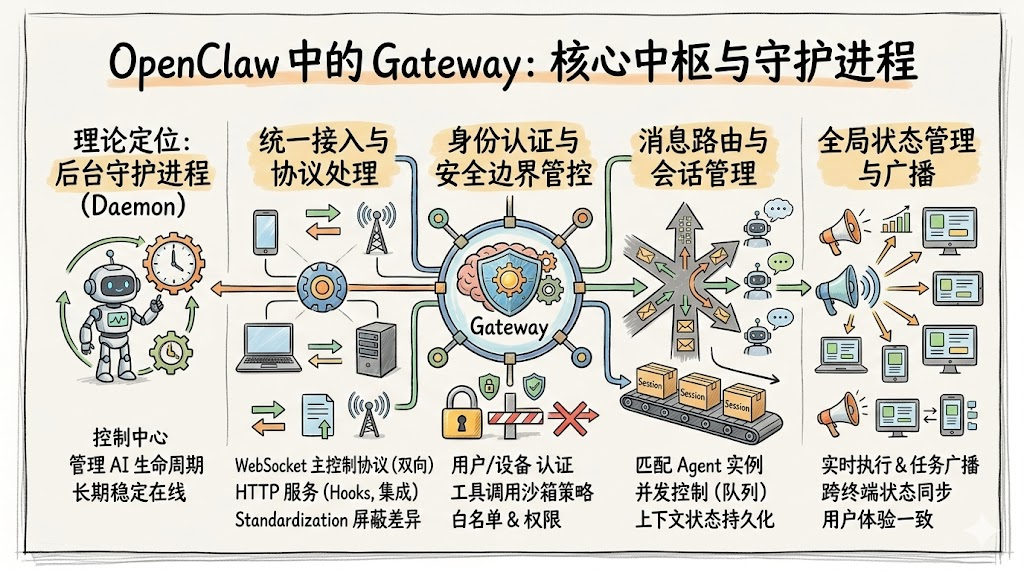
The Gateway is the heart of the entire system.
It manages every connection, session, configuration value, scheduled job, and webhook — but it does no "thinking" itself. Thinking is delegated to the Agent.
Think of it as a "telephone switchboard": messages from every channel come in, and it routes them to the right Agent.
Channels (Messaging Adapters)
Every chat platform has its own adapter that decouples from the Agent through a message bus.
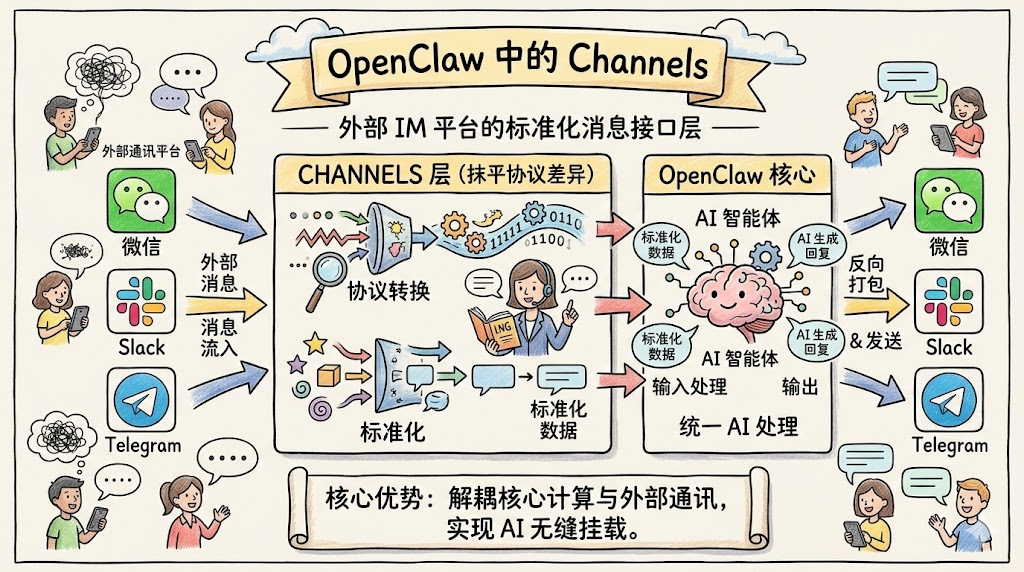
You can connect WhatsApp, Telegram, and Slack at the same time, and your experience talking to the AI assistant on any of them will be identical.
Hooks (Extension Mechanism)
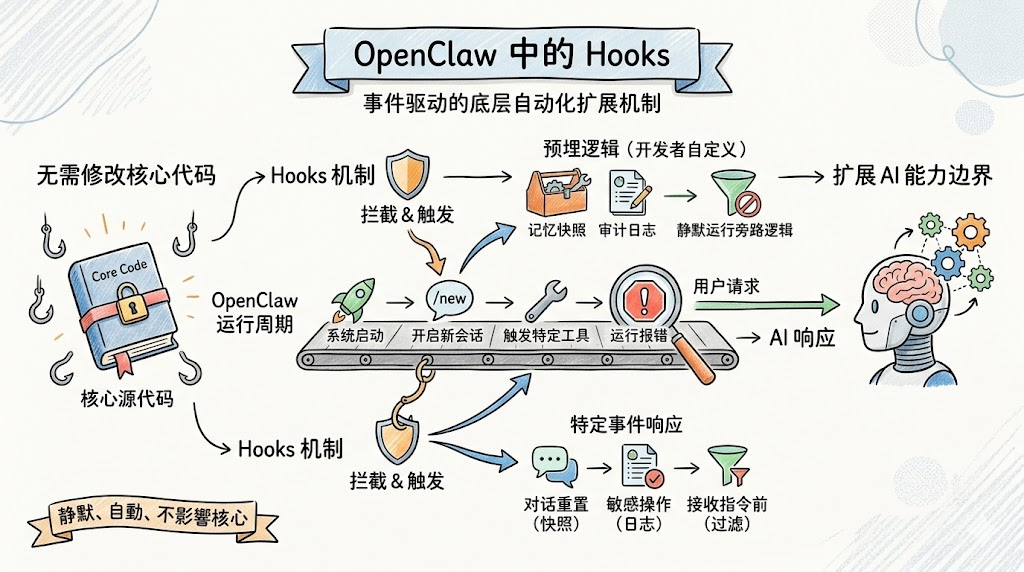
During OpenClaw's runtime, the system continuously emits lifecycle events (system startup, opening a new session via /new, triggering a specific tool, hitting an error, and so on).
Hooks let developers pre-register specific logic that automatically intercepts and runs when those system events fire.
CronJob (Scheduled Tasks)
Conventional AI assistants are passive — they only work when a user prompt wakes them up.
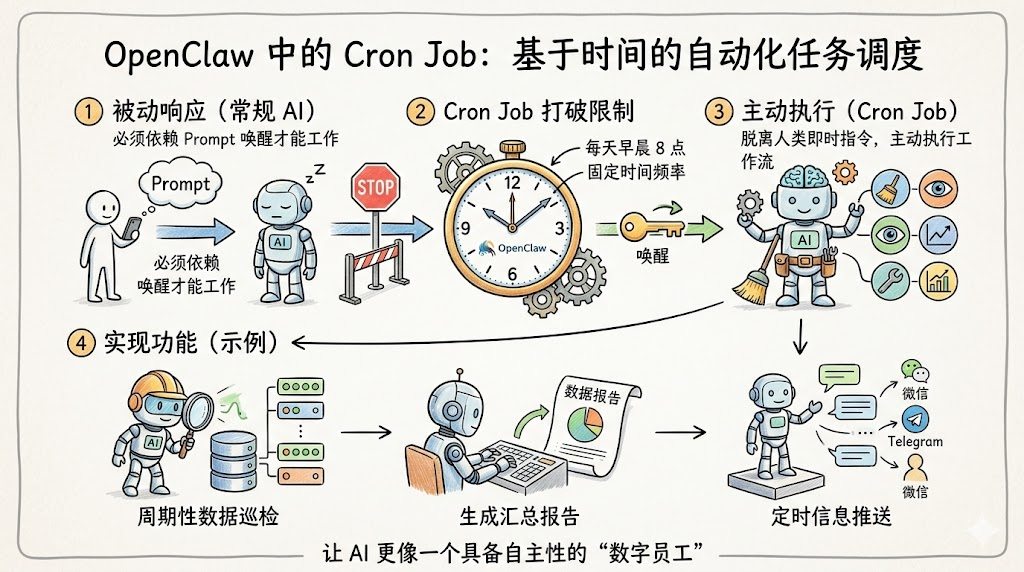
By configuring time-based scheduling rules, the system can wake an Agent up at specific moments (such as 8 a.m. every day) or at fixed intervals to run a predefined workflow in the background.
This means OpenClaw can run periodic data sweeps, generate summary reports, or push notifications without waiting for a human prompt — its behavior starts to look like a self-directed digital employee.
How the Four Core Concepts Work Together
The Gateway is the central hub of the system — the entry and dispatch point for every component.
Channels are the user-facing interaction surface, providing standardized user instructions to the Gateway.
Hooks are the event extension mechanism, enabling non-invasive enhancements based on events the Gateway dispatches.
CronJob is the active execution engine, scheduling Agents through the Gateway to run automated tasks.
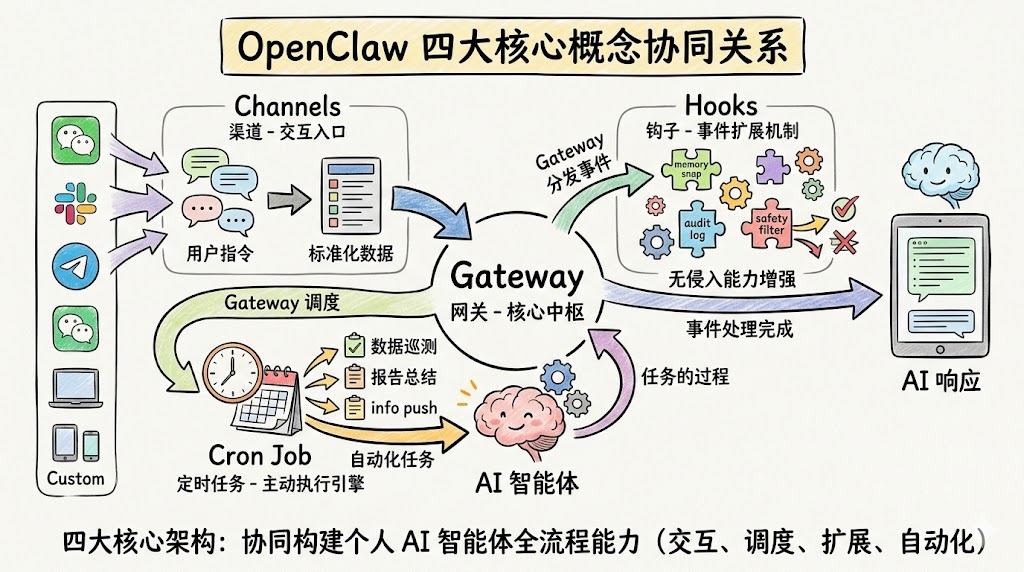
Together, these four modules form OpenClaw's highly extensible, highly controllable, highly flexible core architecture, supporting the full lifecycle of a personal AI Agent: interaction, scheduling, extension, and automation.
The Memory System: OpenClaw's Soul
This is OpenClaw's most groundbreaking design. It uses a layered memory architecture:
| Layer | File | Purpose |
|---|---|---|
| Identity | SOUL.md | Defines the AI's personality, tone, and behavioral boundaries |
| User | USER.md | The user's profile and preferences |
| Operations | AGENTS.md | Operating manual, workflows, capability boundaries |
| Index | MEMORY.md | Index of core information, kept compact (<40 lines) |
| Project | memory/projects.md | Current state and to-dos for each project |
| Infrastructure | memory/infra.md | Quick reference for servers, APIs, deployment config |
| Lessons | memory/lessons.md | Mistakes, classified by severity |
| Daily log | memory/YYYY-MM-DD.md | Raw daily notes |
As one community user put it:
"After a month, your lobster will know your work routine, your communication preferences, the projects you're moving forward, the details you hate, the tools you use, and what "the usual" actually means across a dozen different tasks."
This compounding effect of continuous use is something no stateless AI tool can replicate.